Warehouse operations templates

Warehouse Excel templates that stop you rebuilding the same spreadsheet every week.

The free LogisticsDeck tools answer a question now. These Excel trackers help you manage the number over time — with targets, trends, accountability, and a file your team controls.

One-time purchaseNo subscriptionNo macros requiredData stays in Excel
Available Excel trackers
01
Warehouse KPI TrackerDaily performance & KPI management
02
Cycle Count TrackerInventory accuracy & cycle counts
03
Labor Productivity & Staffing PlannerForecast workload, capacity, headcount & backlog

Track and manage over time. Free tools answer a question quickly; these available Excel templates support a repeatable routine. AI Reviews are a separate guided analysis service. Template purchases do not include AI review credits or automatic data syncing.

Designed for actual operations

Useful enough to become part of the routine.

Not a decorative dashboard. Each tracker starts with the work your team already does and turns it into a consistent management view.

Enter the facts once

Daily or cycle-count data goes into one structured workflow instead of disconnected spreadsheets.

Use your targets

Configure the standards that matter at your site instead of inheriting someone else's assumptions.

Review trends, not vibes

See the current result in context with weekly, monthly, or shift-level performance.

Individual trackers

Buy the problem you actually need to solve.

Choose a focused tracker for daily performance, inventory accuracy, or labor planning.

Warehouse KPI & Daily Performance Tracker · sample layout
Workload completion97.4%On target
Output / employee61.8+3.0%
Attendance94.6%Watch
On-time shipping98.1%On target
12-week performanceActual vs target
Backlog above alert levelOwner: 2nd shift supervisor
Order accuracy on target99.7% this period
Weekly review readyShift comparison updated
Illustrative page preview · sample data
Daily performance
Daily warehouse management

Warehouse KPI & Daily Performance Tracker

Give supervisors one place to record the shift. Give managers one place to review the operation.

$24.99one-time purchase
  • One row per shift for planned workload, completed workload, backlog, staffing, labor hours, service and quality inputs
  • Workload completion, output per labor hour, output per employee, attendance and overtime against configurable targets
  • On-time shipping and order-accuracy KPIs when your operation tracks them
  • Dashboard filters for reporting period and shift, plus shift-to-shift comparison
  • 12-week weekly summary built for management review
  • Issues & actions log with owner, due date and follow-through
  • 3,000 shift rows — roughly four years at two shifts per day
Best for: warehouse managers, directors and supervisors who want one daily operating file instead of several disconnected sheets.
Excel .xlsx · sample-data version + clean working copy · built-in Start Here and Support tabs · Excel 2010+ on Windows or Mac.
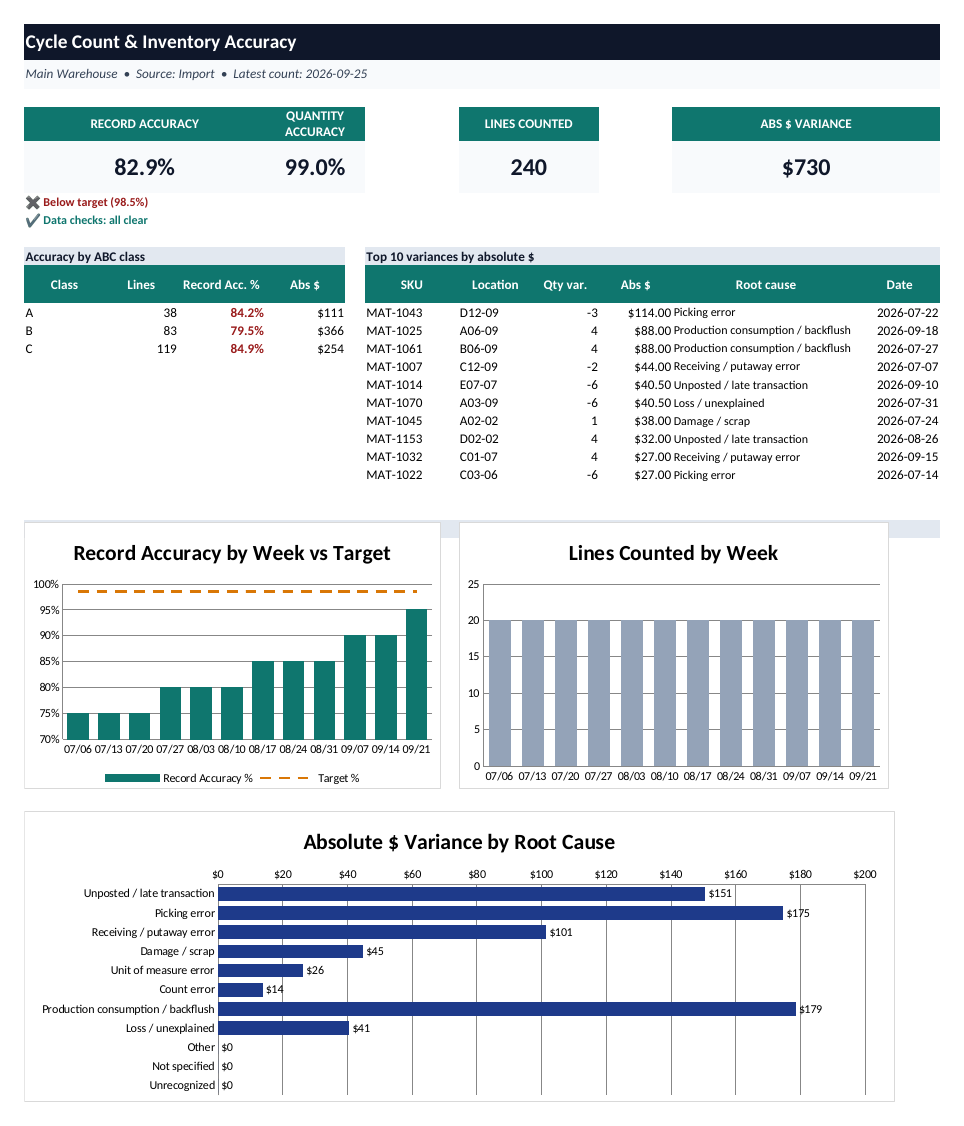
Cycle Count and Inventory Accuracy Tracker dashboard with sample dataView full size ↗
Actual dashboard · sample data
Inventory control
Import or manual entry

Cycle Count & Inventory Accuracy Tracker

Turn cycle counts into record accuracy, quantity accuracy, dollar exposure, root causes and a weekly management view.

$19.99one-time purchase
  • Manual count entry or paste an existing WMS / ERP cycle-count export
  • Map your source headers once instead of rebuilding the export to match the workbook
  • Record accuracy using your count tolerance, plus quantity accuracy
  • Absolute and net dollar variance using unit cost
  • ABC-class performance, 12-week trend, top dollar variances and root-cause analysis
  • Reason-code translation table for system-specific variance codes
  • Up to 5,000 normalized count lines per import
Best for: inventory-control teams and warehouse managers who need a repeatable way to turn counts into an accuracy story.
Excel .xlsx · sample-data version + clean working copy · no VBA/macros · Excel 2010+ on Windows or Mac.
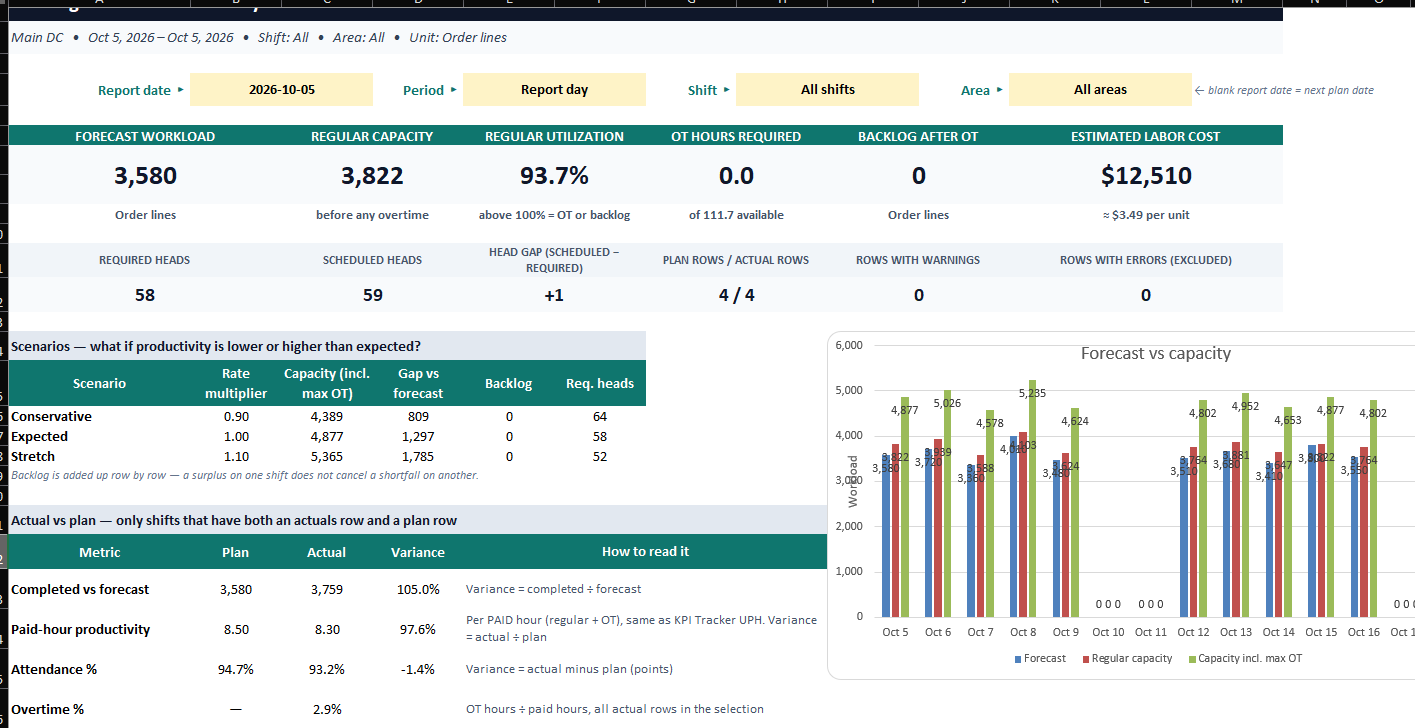
Warehouse Labor Productivity and Staffing Planner dashboard with sample dataView full size ↗
Actual dashboard · sample data
Labor planning
Forecast, staff, compare

Warehouse Labor Productivity & Staffing Planner

Turn a workload forecast into a staffing plan — or start with the crew you have and see what they can realistically clear.

$29.99one-time purchase
  • Plan by workload: forecast volume → required present and scheduled headcount
  • Plan by headcount: scheduled crew → regular capacity, shortfall, overtime and backlog
  • Expected attendance, paid hours, paid breaks and other nonproductive time built into the plan
  • Productive-hour rate plus paid-hour productivity equivalent so the planner reconciles with daily KPI reporting
  • Row-level overrides for different shifts, areas, attendance, hours, rates, overtime limits and labor cost
  • Conservative, expected and stretch productivity scenarios to expose fragile plans before the shift starts
  • Actual-vs-plan comparison for workload, productivity, attendance and overtime
  • Row checks for duplicate plans, bad dates, invalid shift/area names and unusable assumptions
Best for: warehouse managers and supervisors who need to turn forecast volume into a defensible staffing plan instead of a headcount guess.
Excel .xlsx · sample-data workbook · save a working copy and clear the sample input rows · no VBA/macros · Excel 2010+ on Windows or Mac.
Which one fits?

Three different jobs.

The KPI Tracker manages daily execution. The Cycle Count Tracker goes deeper on inventory accuracy. The Labor Planner helps you staff the work before the shift starts.

CapabilityWarehouse KPI TrackerCycle Count TrackerLabor Planner
Daily workload / backlog✓—Forecast / planned backlog
Labor productivity / attendance✓—✓
On-time shipping / order accuracy✓——
Inventory record / quantity accuracy—✓—
Dollar variance—✓—
Required headcount / capacity planning——✓
OT / backlog scenario planningHistorical OT—✓
Actual vs planDaily actuals vs targetsCount results vs target✓
Best cadenceDaily / weeklyEach count cycle / weeklyBefore each shift / weekly review
FAQ

Before you buy.

Do I need macros or VBA?

No. All three current trackers are standard .xlsx workbooks driven by formulas and protected calculation sheets.

Does my data leave Excel?

No. The trackers run locally in the workbook. They do not upload your warehouse data to LogisticsDeck.

Will the Cycle Count Tracker handle a messy system export?

It is designed to accept the export with its existing headers, then map those source headers to the fields the tracker needs. It also includes handling described in the workbook for different column order, title rows and numbers stored as text.

What if I do not track every KPI in the Warehouse KPI Tracker?

Leave that input blank. The tracker is designed so blank means “not tracked,” rather than forcing zero into a KPI you do not use.

What Excel version do I need?

The current workbooks are built for Excel 2010 or later on Windows or Mac. Google Sheets and Apple Numbers are not supported.

What do I receive?

Each product is delivered as a customer-ready Excel workbook. The Labor Planner ships as a sample-data workbook so you can keep the original as a reference, save a working copy, and clear the sample input rows before loading your own operation.